Product
Estimate, schedule, control, report.
Each area works from the same project data, so a change in one shows in the others. The assistant prepares the routine work; people approve it.
Estimating
Estimates you can defend.
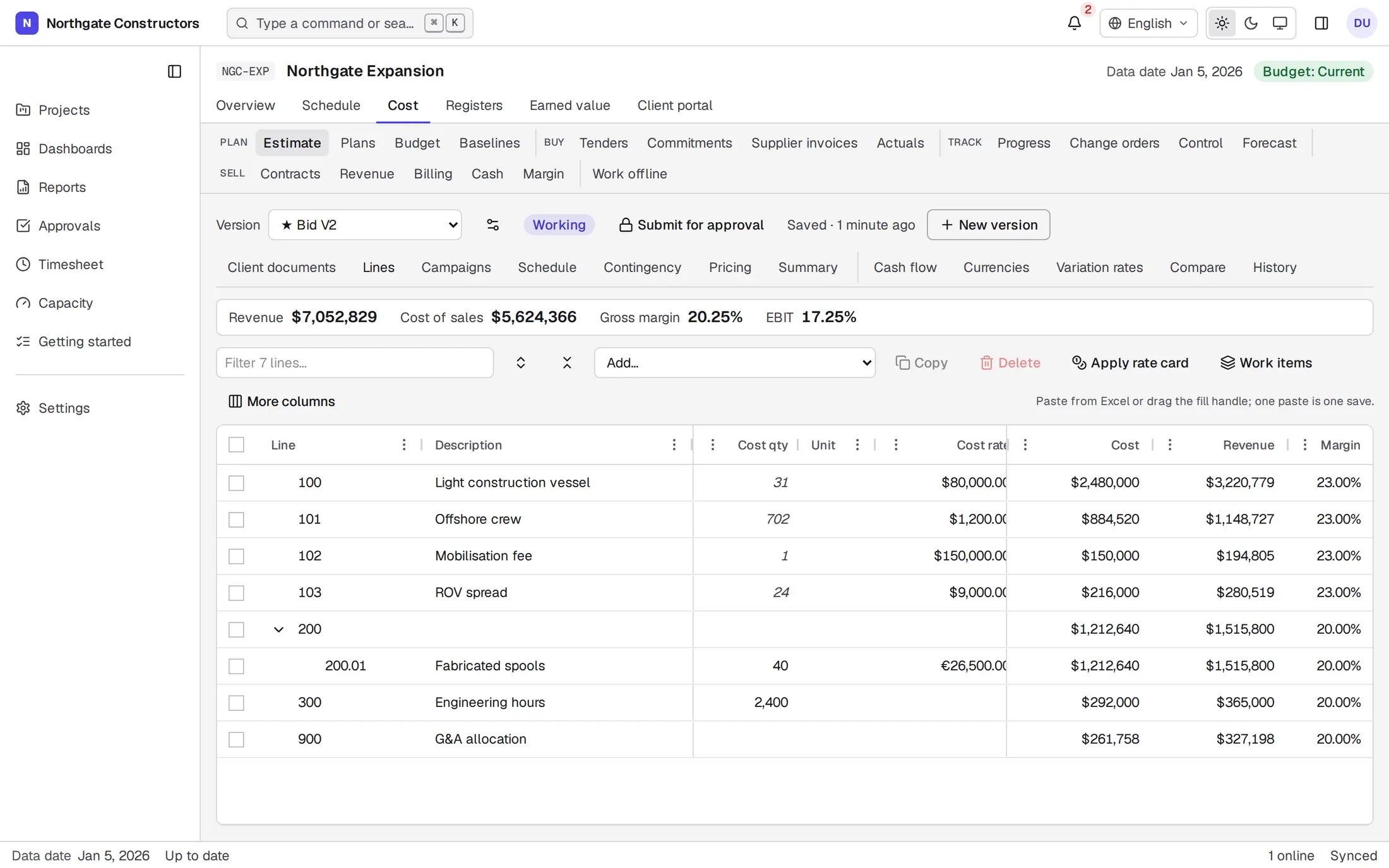
Build the bid from your own rate cards and reusable work items. Every version keeps its lines, quantities, rates and margin, so you can show what changed and why.
Rate cards and work items
Price crews, equipment and materials from rate cards, and reuse priced work items with their recipe of resources.
Campaigns and plans
Price a vessel spread or a crane campaign by duration and day rate, and see the estimate as a manpower plan, a procurement list or any view you name.
Versions you can compare
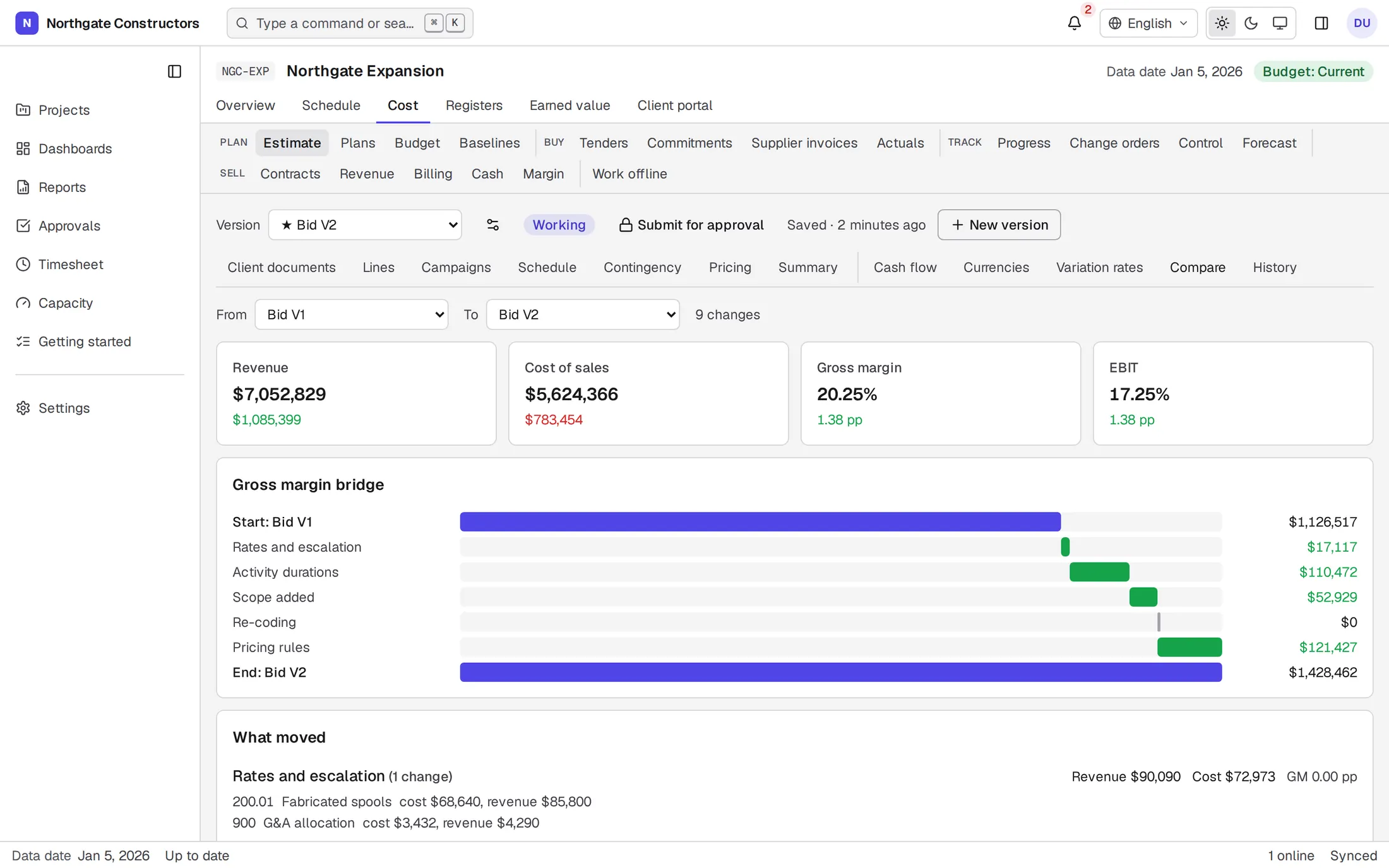
Compare two versions line by line and see what each change did to the gross margin.
Pricing rules and risk
Markup, target margin, overheads, taxes and contingency, applied by rules you set.
Tenders and quotes
Read the client's documents into lines, and compare subcontractor quotes package by package.
Check, submit, approve
A check before submitting flags unpriced lines, missing exchange rates and a margin under your floor. Then an owner approves the bid.
Cash flow of the bid
See the cash the job needs under its payment terms, before you commit to the price.
Carbon beside cost
The estimate's embodied carbon next to its cost, from your own factor library.
Estimate classes
How close can this estimate be?
Estimate classes 5 to 1, with their expected accuracy and contingency checks. Pick a class to see its range on a sample estimate.
Class 5 · Screening or concept
Project defined: 0% to 2%
The final cost could land anywhere from 6,250,000 to 25,000,000.
The estimate12.5M
Widest expected range-50% to +100%
Narrowest expected range-20% to +30%
When an estimate is checked, a contingency that looks low for its class is flagged.
Scheduling
Critical-path scheduling on the same rules as P6.
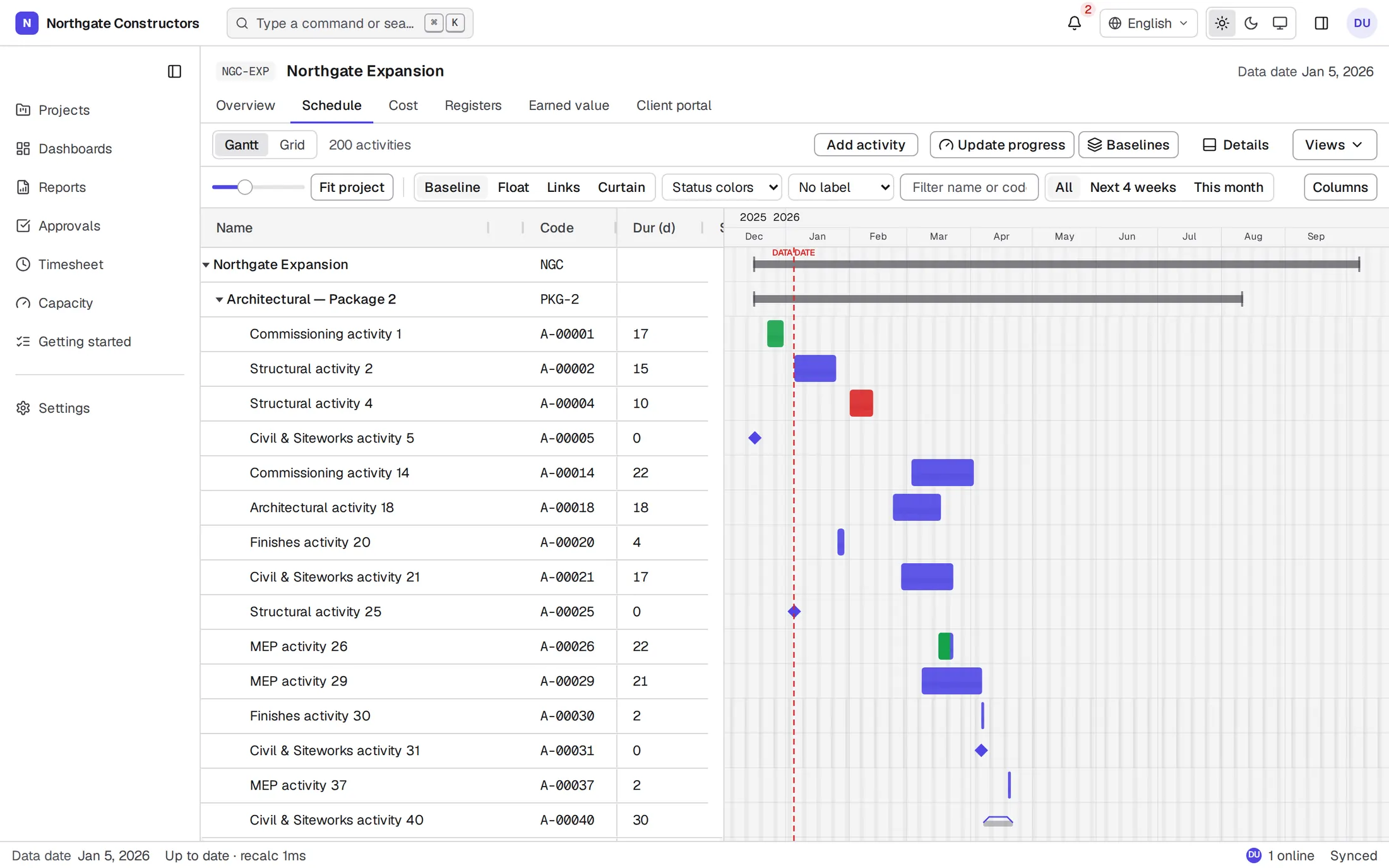
Bring the schedule in from Primavera P6 or Microsoft Project, or build it here. Update progress against a data date, keep baselines and see the finish move.
P6 files in
Create a project from an XER file or a Microsoft Project XML file.
A critical path you can trust
Calendars, constraints, all four relationship types and lags, calculated on the same rules as P6.
Edit in the Gantt
Add activities and milestones, link them, set durations, calendars and constraints, with undo.
Progress and the data date
Update by percent, quantity or steps. One save moves the data date and the plan recalculates.
Baselines
Save baselines, choose the primary one, and compare the finish and every bar against it.
Schedule checks
The assistant checks logic, open ends, negative float and late starts, and proposes fixes for approval.
Risk simulation
Give activities a range of durations and simulate the likely finish and cost.
Linked to the estimate
Campaigns and time-based lines follow their activities, so a schedule change re-prices them.
Cost control
One cost report, cost code by cost code.
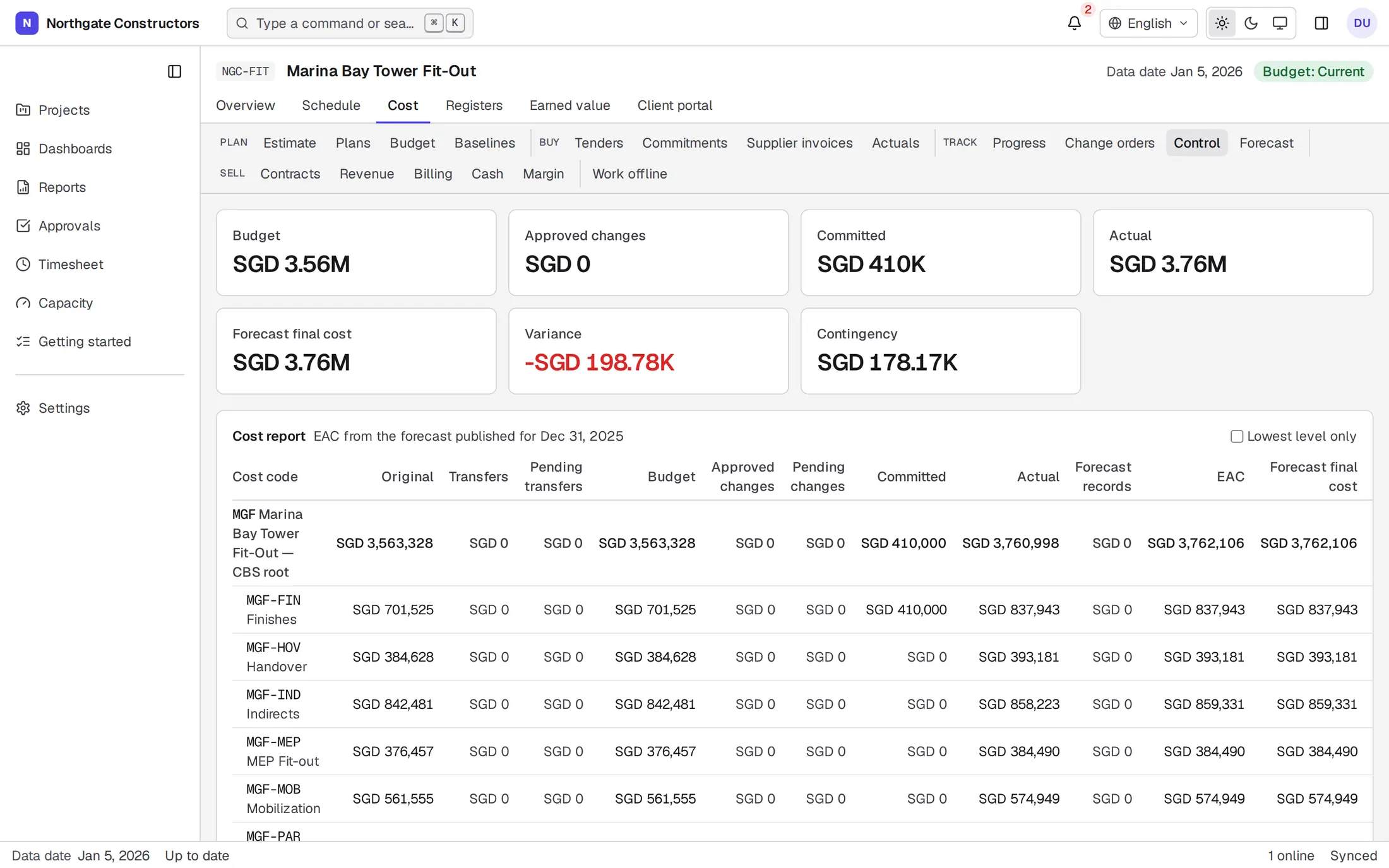
Budget, approved changes, commitments, actual cost and the forecast at completion, side by side for every cost code. Earned value, cash and margin come from the same numbers.
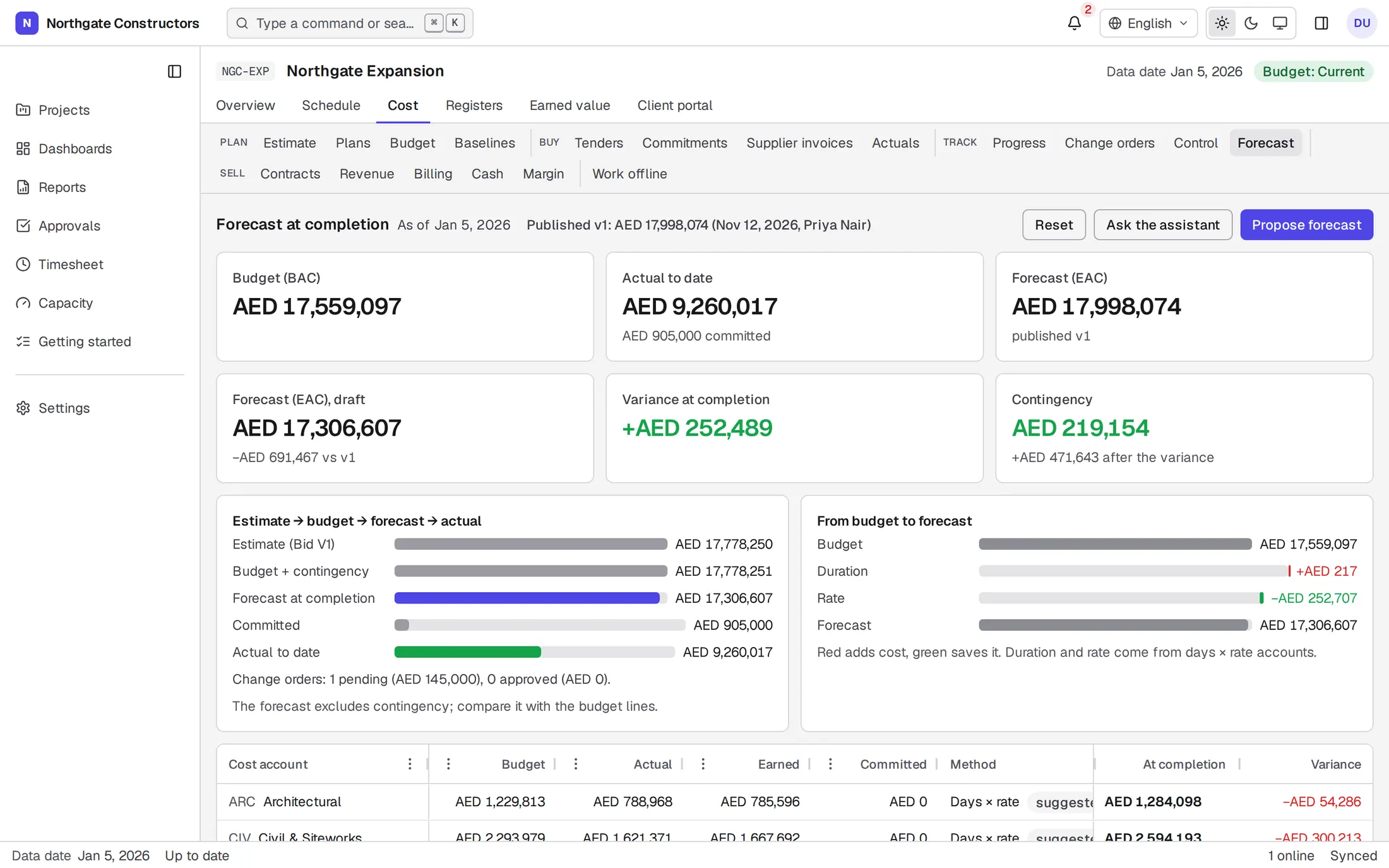
A budget from the bid
The approved estimate becomes the control budget. Revisions and transfers keep their history.
Commitments and actual cost
Orders, subcontracts and supplier invoices. Paste or import actual cost from a spreadsheet, or connect a source once.
Changes in one approval
A change carries its cost, its price, its schedule effect and its cash. One approval applies them together.
A forecast you can explain
An estimate to complete for each cost account, by a method you choose, published through an approval.
Earned value
SPI, CPI, EAC and TCPI, each with a plain reading, and the S-curve period by period.
Cash and margin
Cash under the contract's real payment terms and retention. Revenue and margin recognised as the work progresses.
Contracts and claims
Client contracts and subcontracts, progress claims, certificates, retention and payment milestones.
Period close
Close periods in order, with checks before each close.
Earned value
Try earned value on a sample budget.
Set how much work was planned and done by now, and what it cost. PPM.Cloud reads the indices the same way on your projects.
Budget at completion 2,400,000
Sample project, fictional figures
- SPISchedule performance
- 0.84
- CPICost performance
- 0.88
- EACForecast at completion
- 2.74M
- Planned value
- Earned value
- Actual cost
- Forecast
What PPM.Cloud says
- Behind schedule: less work is done than was planned by now.
- Over budget: the work done has cost more than its budget.
At this cost performance the project would cost 2,742,857: 342,857 over the budget.
The assistant
An assistant for the routine work, with people in charge.
The assistant reads the project and prepares the work: briefings, checks, forecasts and drafts. It has no way to change data. Everything it proposes waits for a person.

Briefings
Ask for a short briefing: where the project stands, what changed and what to act on first.
From a brief to a first plan
Describe a project and get a first breakdown with its logic, to review before anything is created.
Forecast drafts
A proposed method and estimate to complete for each cost account, ready for review.
Variation orders
A change's figures turned into the variation order text for your client.
Tender take-off
Lines read from the client's tender documents, proposed into the estimate.
Help with uploads
When a workbook upload cannot go through, each problem comes with a proposed fix.
Four eyes
Whoever proposes cannot approve. Proposals from people and from the assistant follow the same rule.
Your own assistant, too
Connect the AI assistant your team already uses. It sees only the projects its user may see.
On site
The field, on a phone.
Progress and hours go in where the work happens. The screens fit a phone, and the numbers are the same ones the office works from.


Progress cards
One card per activity, with the input your rule of credit asks for, actual dates and the finish against baseline.
Timesheets
A week day by day on the phone, or as a grid on the desktop. Approved hours post to actual cost.
Approvals on the move
The approvals inbox and its cards work on a phone, so decisions do not wait for the office.
Reporting
Report packs, ready to send.
Weekly progress, earned value, schedule health and cost by account, built from live data and sent on schedule. Your client follows the project in a portal of their own.
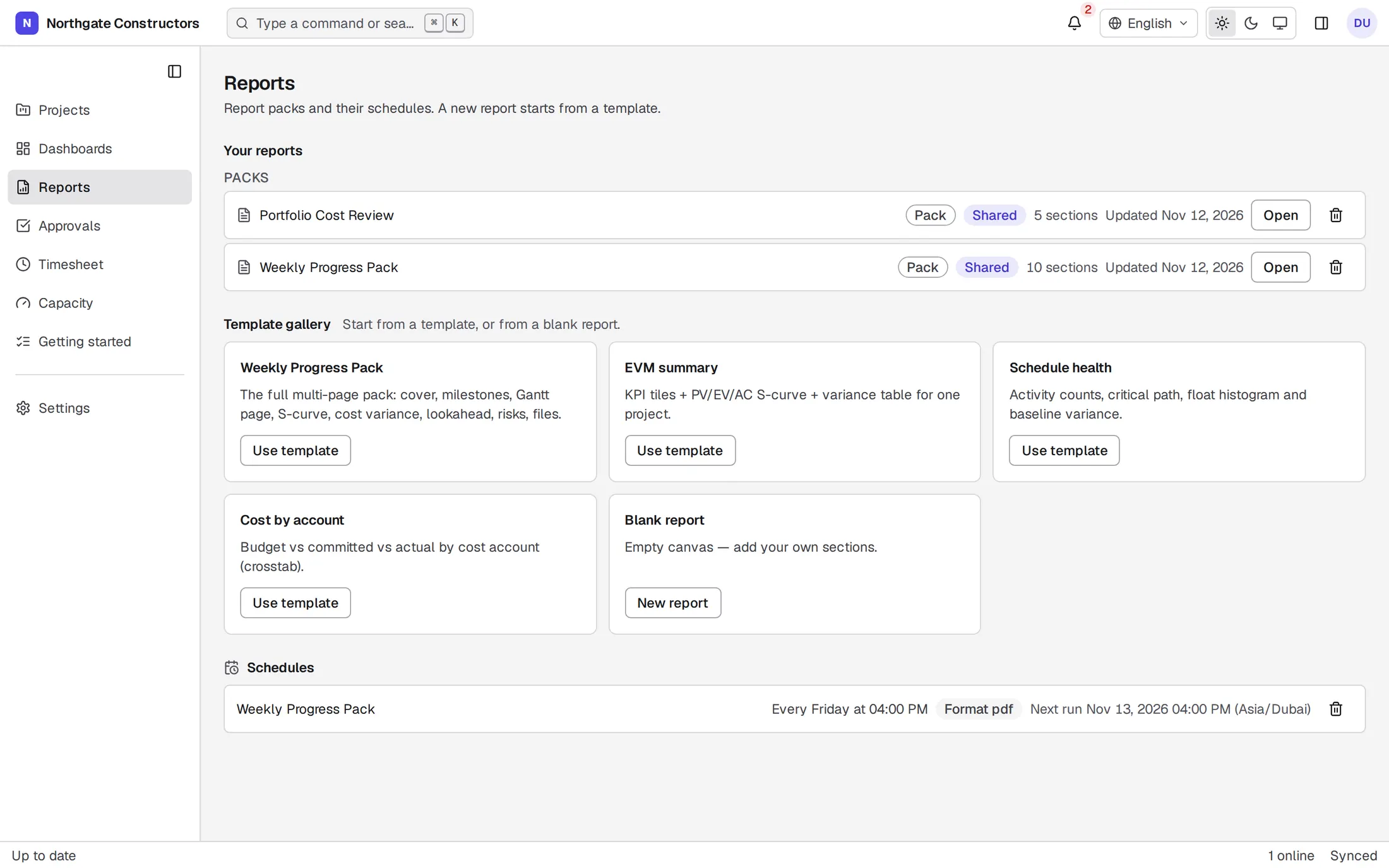
Templates to start from
Weekly progress pack, earned value summary, schedule health and cost by account, or a blank report.
Sent on schedule
Send a pack as a PDF every Friday, or whenever you choose.
In each reader's language
Each pack in its own language, with an optional second language on the cover.
Client portal
Clients see progress and the forecast completion, and accept or reject variations with a typed signature.
Registers
RFIs, permits, risks or anything you track, as registers with your own fields.
Work offline in Excel
Download a workbook, work offline, upload it again. Every row is checked against what changed meanwhile.
Data connections
Bring actual cost, orders and invoices in from your ERP, a REST API or files. Mapped once, approved by a person.
Dashboards
Portfolio and project dashboards from the same figures as the screens.
Try it on the sample project.
Your free workspace opens with a project already estimated, budgeted and under way.